Anything you want to read, you can listen to instead: a webpage, a PDF, a book, a printed page, the tabs piling up in your browser. Timber reads it aloud in a voice you choose.
Anything you want to read, you can listen to instead: webpages, PDFs, books, printed pages, your open tabs.
Timber pulls out the full text before it says a word. What you bring in is what you hear, start to finish.
01
Bring it in.
Paste a link, share from Safari, open a PDF, EPUB, Word or PowerPoint file, or point your camera at a printed page.
02
Pick a voice.
Play a sample before you download. Once it is on your phone, it works with no connection.
03
Listen, and never lose your place.
Every word lights up as it is spoken, whether you slow the voice down or speed it up.
✶
Scanned chapters repeat a header on every page. Timber spots it and silences it across the whole document in one tap.
The voices
Every library has a free place to start.
In every language, each library gives you a free male and a free female voice. Every Apple voice on your device works too, and so does your Apple Personal Voice.
All seven run on your phone
AppleThe voices already in iOS, free in every quality tier.
PiperThe widest reach across languages, in small, quick downloads.
KokoroWarm, expressive voices for long, easy listening.
SupertonicClear, lifelike voices across 31 languages.
PocketRead in your own voice, from a short recording kept on your phone.
KittenTTSEight English voices in one small, fast download.
MossAnother way to hear your own voice, made on the phone.
Also inside
And a great deal more too.
Every screen below is the app as it ships, not a mockup.
A library came with it.More than 70,000 public-domain books from Project Gutenberg.
Get the gist first.A short summary, made on your phone from the article’s own sentences.
Ready for class.A student copy with room to answer, and a teacher copy with the key.
Everything you saved.Filtered how you like, with a queue that waits for you.
Find a voice in your language.Search more than 3,700 voices, or browse them by language.
Your own voice.Record about 30 seconds and Timber builds a voice that sounds like you. It stays on your phone unless you share it.
✶Follow feeds. New posts from the sites you read, waiting to be heard.
✶Hands free. Play, pause and skip from the lock screen, headphones, Siri or Apple Watch.
✶Take it with you. Export any article as spoken audio.
✶Fall asleep to it. A sleep timer stops the reading for you.
✶On every device. Your library follows you through your own iCloud, if you want it to.
✶Make it comfortable. Size, typeface and line spacing, tuned your way.
Trust
Offline and private.
Today every voice runs on your phone, so Timber keeps reading on a plane, in a tunnel, anywhere. Nothing you read leaves your phone unless you ask it to.
Timber will never
✖
Share or sell what you read, or use it for ads.
✖
Look at your clipboard unless you hand it over.
✖
Hand your voice recordings to anyone as training data.
Most big read-aloud apps send your text to a server and charge a subscription for the good voices. Timber reads on your iPhone. The longer comparisons below say where the others win.
The free reader is complete. Pro is for listening further.
Pro opens the rest of the voice catalog, the full speed range and a few extras. It also keeps a free, private reader going for everyone else.
Free · alwaysNo account
✶The whole reader and every way in: links, files, the camera, feeds, Project Gutenberg
✶300+ voices in 71 languages
✶Every word lit up as it is spoken, on every voice
✶Listening from 0.5× to 1.25×
✶The full dyslexia mode and every accessibility setting
✶Summaries and translation, made on your phone
✶Worksheets from what you marked, with MLA and APA citations
✶Your Apple Personal Voice, always
✶iCloud sync through your own private iCloud
✶Export to text, Markdown, PDF or spoken audio
Pro · optionalSubscribe or pay once
✶The full voice catalog beyond each library’s free pair, 3,700+ voices in all
✶The whole speed range, from 0.3× to 3×
✶Every color palette, not only the free three
✶As many voices as a dialogue needs (free gives each article two)
✶CarPlay
✶Keep using a voice you cloned after its free 24-hour trial. The trial never charges you.
✶No upgrade prompts
✶
Everything in the free list stays free, with or without Pro.
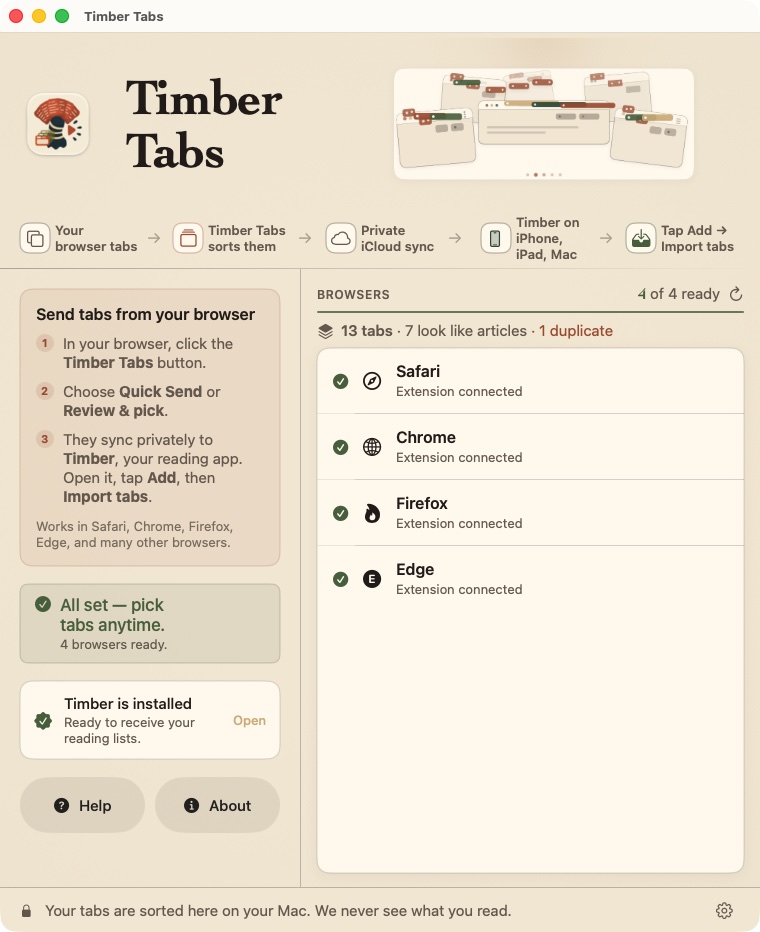
The collector, on your Mac
✶ Timber Tabs · free for Mac & Windows
Your open tabs, turned into a listening queue.
Timber Tabs gathers the tabs you keep meaning to read, groups them by site, and pre-selects the ones that read like articles. Keep what you want, then send the list to your iPhone or save it as a .timberlist file.
† On Windows? Use the Chrome, Edge or Firefox extension. No Mac needed. See how →
Safari
Chrome
Firefox
Edge
Brave
Arc
Opera
† …and any other Chromium browser, through the extension. Firefox always needs the extension.
✶
Your tabs are sorted on your Mac, or right in your browser on Windows. Timber Tabs reads only their titles and addresses, never the pages, and sends nothing to a server of ours.
Start listening
Your eyes can be tired, busy, or somewhere else. The reading still gets done.
† Free to download · no account · iOS 18 and later